
L Shaped Standing Desk vs Straight Standing Desk: Which Is Better?
Choosing the right desk can make a big difference to how comfortable and productive you feel during the working day. As more people move towards ergonomic workspaces, standing desks have become a popular choice for both home offices and commercial environments.
One of the most common questions people ask is whether an L shaped standing desk or a straight standing desk is the better option.
Both designs have clear advantages, but the right choice depends on your workspace, the equipment you use, and how you like to work.
In this guide, we’ll compare the two styles and explain why many people are choosing an L shaped standing desk for a more flexible and efficient setup.
At HADO (Height Adjustable Desks Online), we work closely with customers across the UK who are looking to upgrade their workspaces with reliable, high-quality adjustable desks. We offer a range of quality desks, including L shaped corner desks and traditional straight desks, designed to support healthier and more productive working.
What Is a Straight Standing Desk?
A straight standing desk is the most common style of height adjustable desk. It has a simple rectangular shape and raises or lowers so you can alternate between sitting and standing.
These desks are popular because they are:
- Easy to fit into most rooms
- Simple to assemble
- Suitable for single-monitor or laptop setups
- Usually more compact
Straight standing desks are often a good starting point for people new to sit-stand working. They work particularly well in smaller home offices where space is limited.
However, while they are practical, they may not provide enough surface area for users with larger setups, multiple monitors, or equipment that requires extra workspace.
What Is an L Shaped Standing Desk?
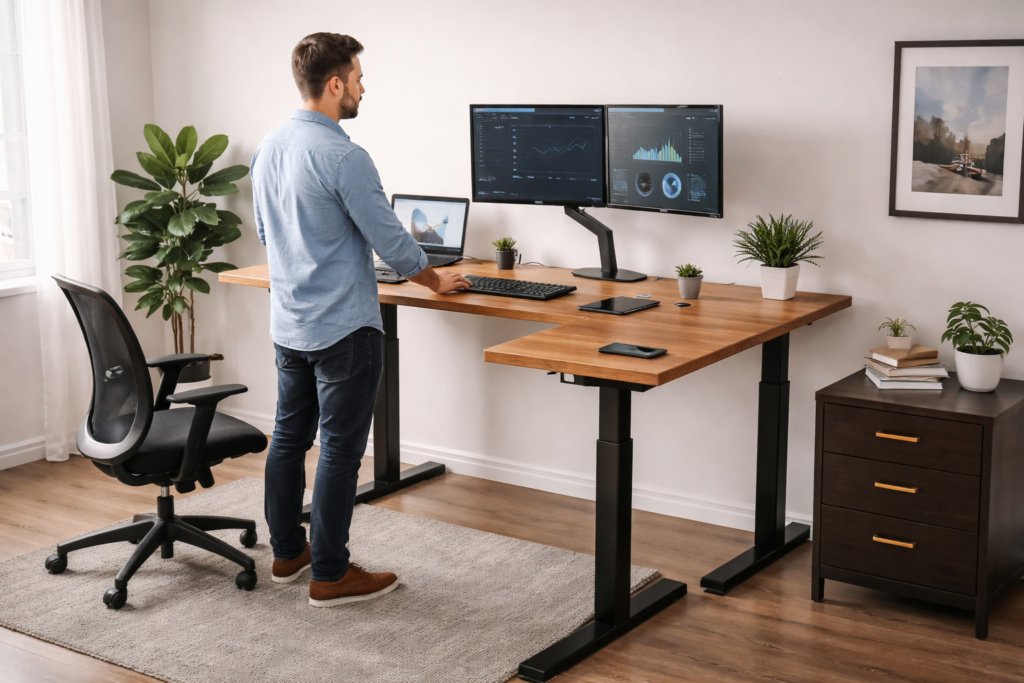
An L shaped standing desk (sometimes called a corner standing desk) features two connected work surfaces that form a right angle. This design creates a larger workstation that fits neatly into a corner or along two walls.
The main benefit of this layout is that it gives you significantly more usable desk space without taking up much additional room.
Many professionals prefer L shaped desks because they allow you to organise different tasks across separate areas of the desk. For example:
- One side for computer work
- One side for paperwork or meetings
- A dedicated area for additional monitors or equipment
At HADO, our L shaped standing desks are designed to combine ergonomic height adjustment with a practical corner layout. This makes them ideal for modern workspaces where flexibility and comfort matter.
Workspace and Surface Area
One of the biggest differences between the two desk types is the amount of workspace available.
Straight Standing Desk
Straight desks provide a single surface. While this works well for simple setups, it can quickly become crowded if you have multiple devices or accessories.
Typical setups on straight desks include:
- Laptop and keyboard
- Single monitor
- Basic desk accessories
Once you add extra screens, speakers, paperwork, or docking stations, space can become limited.
L Shaped Standing Desk
An L shaped standing desk offers much more surface area. This allows you to spread out your equipment and organise your workspace more efficiently.
Many people divide their workspace like this:
- Main computer and monitors on one side
- Writing space or secondary tasks on the other
This layout makes it easier to stay organised and switch between tasks during the day.
Productivity and Workflow
Desk design can have a direct impact on how efficiently you work.
A straight standing desk works well for focused tasks, especially if your work revolves around a single screen or device. However, when your workflow involves multitasking, switching between applications, or handling documents, the limited space can slow things down.
An L shaped standing desk naturally supports a more dynamic workflow. Because there are two working areas, you can separate different tasks. For example:
- Primary screen and keyboard for active work
- Secondary monitor for communication or reference material
- Additional space for notebooks or tablets
This arrangement helps reduce clutter and allows you to keep everything within easy reach.
Ideal for Dual or Multiple Monitor Setups
Many professionals now use two or three monitors to improve their productivity. In these situations, the amount of desk space becomes very important.
Straight desks can handle dual monitors, but the setup may feel cramped depending on the desk size.
An L shaped standing desk is often the better choice for multi-monitor workstations because the extra surface area allows you to position screens more comfortably. You can place your main monitors directly in front of you and use the second side of the desk for additional screens or equipment.
At HADO, many customers choose our corner standing desks specifically because they support larger monitor setups, gaming rigs, or creative workstations.
Making the Most of Your Space
It might seem like an L shaped desk would take up more room, but in many cases it actually uses space more efficiently.
Straight desks usually sit against a single wall, leaving unused space in corners of the room.
An L shaped standing desk fits neatly into that corner space, turning an awkward area into a productive workstation.
This makes them particularly popular in:
- Home offices
- Small business workspaces
- Shared office environments
- Study rooms
By using the corner of a room, you maximise desk space without making the room feel crowded.
Ergonomics and Comfort
Both desk types provide the core benefit of sit-stand movement, which helps reduce the risks associated with long periods of sitting.
Alternating between sitting and standing throughout the day can help:
- Reduce back and neck strain
- Improve posture
- Increase energy levels
- Encourage more movement
However, an L shaped standing desk can provide additional ergonomic benefits because it allows you to position equipment more naturally. For example, you can keep frequently used items within easy reach while placing secondary equipment slightly to the side.
At HADO, our adjustable desks are designed with smooth height adjustment, sturdy frames, and reliable motors so users can switch between sitting and standing with ease.
Which Desk Should You Choose?
The best desk depends on your workspace and how you work.
A straight standing desk may be the right option if:
- You have a small workspace
- Your setup is simple
- You mainly use a laptop or single monitor
An L shaped standing desk is often the better choice if:
- You need more desk space
- You use multiple monitors
- You want to organise different work areas
- You want to make better use of a corner
For many professionals, the additional workspace and flexibility of an L shaped desk make it a worthwhile upgrade.
Upgrade Your Workspace with HADO
At HADO, we specialise in ergonomic desk solutions designed to improve comfort and productivity. Our range includes high-quality electric standing desks, adjustable desk frames, and spacious L shaped standing desks suitable for both home and professional environments.
We focus on desks that combine durability, smooth height adjustment, and practical workspace design, helping you create a workstation that supports the way you work.
If you’re considering upgrading your office setup, explore our range standing desks today.