

The 30-Minute Sit-Stand Routine: A Realistic Way to Use Your Desk During Your Workday
The best way to use a sit and stand up desk is to change position regularly, rather than sitting all day or standing all day. A simple routine is to sit for around 25 minutes, stand for 5 minutes, then repeat. This ensures you’re regularly moving without making standing feel like a chore.
At HADO, we believe a height adjustable desk should make your working day easier, not more complicated. That’s why our electric standing desks are designed to help you move between sitting and standing with ease, whether you’re working from a home or in an office.
We supply sit stand desks, electric height adjustable desks and accessories such as monitor arms, cable tidies, memory controllers and anti-fatigue mats.
Is standing all day better than sitting?
No, and that’s not the goal with these types of desks. The aim is to move around more often. Staying in one fixed position for hours, whether seated or standing, can make you feel stiff, tired and lead to a bad posture.
A sit and stand up desk works best when you treat it as a tool for variety. You can sit when you need focus, stand when you want to feel more alert, and adjust the height throughout the day to ensure you’re in a healthy position as often as possible.
The key is to build a habit that feels realistic. You don’t need to overhaul your whole day. Start with a small 30-minute cycle and repeat it when it suits your workload.
How does the 30-minute sit-stand routine work?
The most practical routine looks something like this:
Sit for 20 to 25 minutes while doing work that requires you to focus, such as writing or admin. Then raise your height adjustable desk and stand for 5 to 10 minutes while taking calls, reading, checking emails or planning your next task.
This works because it links changes in posture to naturally occurring parts of your day. Instead of trying to remember to stand randomly, you use common situations during your working day as prompts.
For example, you might stand during a video call, lower the desk afterwards for more immersive work, then stand again while reviewing messages. Over a full day, those small changes can make your workstation feel more active without interrupting productivity.
How high should a sit and stand up desk be?
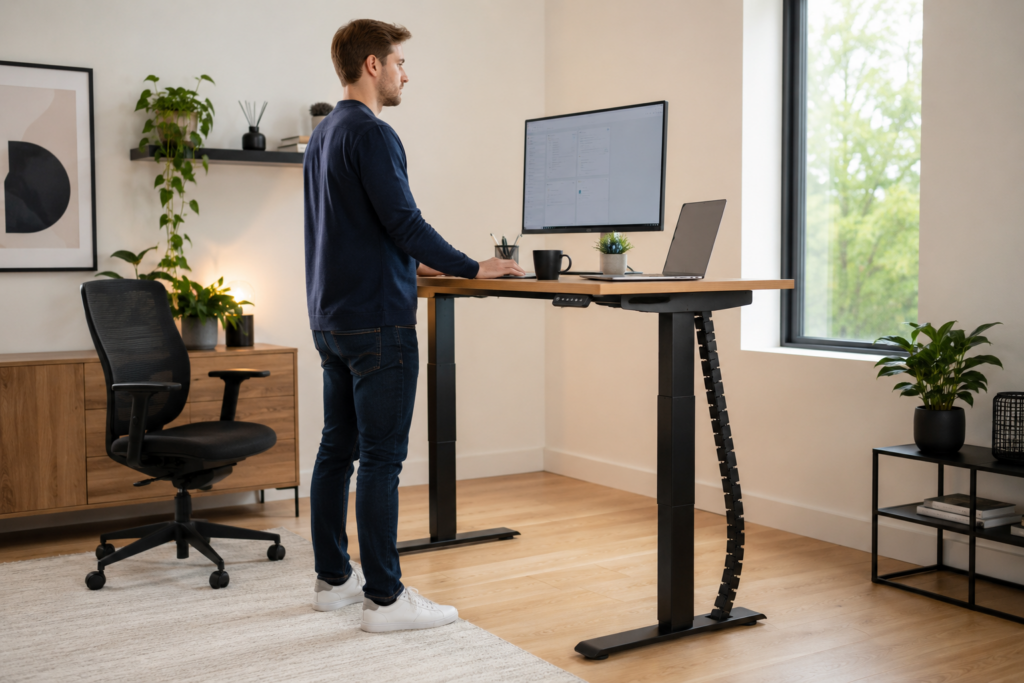
Your desk should sit at elbow height when you’re typing. Your shoulders should feel relaxed, your wrists should stay fairly straight, and your screen should be positioned so you’re not constantly looking down.
When standing, avoid leaning heavily on the desktop. Keep your feet flat, soften your knees slightly and let your arms rest naturally by your sides when you’re not typing. If you use a laptop, a monitor arm or laptop stand can help raise the screen to a more comfortable height.
Our electric standing desk frames are built to stay stable at different heights, helping you create a workstation that feels secure whether you’re sitting or standing. HADO’s HD2 desk, for example, is listed with dual motors, anti-collision technology, a 4-way memory controller option and a height range from 625mm to 1285mm.
Should you use a memory controller?
Yes, a memory controller can make your sit-stand routine much easier. Instead of adjusting your desk by guesswork, you can save your preferred sitting and standing heights and return to them quickly.
This is especially useful if you want to follow a 30-minute routine. When it’s time to stand, you press a button and the desk moves to the right height. When you’re ready to sit, you return to your seated position just as easily.
At HADO, many of our desks can be paired with practical control options, including memory controllers and Bluetooth control on selected models. These small features can make a big difference because they remove friction from the habit.
What tasks are best for standing?
Standing works well for lighter tasks which involve being relatively active. These include phone calls, short meetings, reading documents, checking emails, brainstorming, planning your day or reviewing a list of tasks.
Sitting may be better for deep concentration, detailed spreadsheet work, long writing sessions or anything that requires fine control. The right approach is not about forcing yourself to stand through everything. It’s about matching your position to the task.
A sit and stand up desk gives you that flexibility. You can adapt your workspace to the way you actually work, rather than being stuck at one fixed desk height all day.
Do you need an anti-fatigue mat?
If you stand on a hard floor, an anti-fatigue mat can make standing more comfortable. It adds cushioning and support underfoot, which can help reduce tiredness when you’re using your standing desk for short periods throughout the day.
We offer anti-fatigue mats for users of sit-standing desks, designed to provide cushioning, foot support and a stable surface while standing. They’re a sensible addition if you want to make your 30-minute sit-stand routine feel easier to maintain.
Can this routine work in a small home office?
Yes. You don’t need a huge room to use a height adjustable desk properly. The routine works in compact home offices, spare bedrooms and shared spaces because it’s based on movement, not floor space.
At HADO, we supply desks for both home offices and workplace environments, with a range of electric sit stand desks suitable for remote working setups. A smaller desk, good cable management and a monitor arm can help keep your workspace tidy while still giving you the benefits of regular position changes.
Explore our range of sit and stand up desks today. Or don’t hesitate to contact us for more information.